Review Comments (1) Screenshots (7) Questions & Answers (0) Votes (3) Awards (11) Wiki  
(3)
DigitByte Studio
2.1
www.008soft.com
Shareware
$29.99  Purchase
1 238 people
Download MKV To AVI With...

805.4 KBDownloaded 2498 times

This software was checked for viruses Last month and was found to contain no viruses.
Click here to see antivirus report.
 
Video tutorial for MKV To AVI With Subtitle 2.1
Frame

Review

This is official description

MKV To AVI With Subtitle can convert mkv with subtitle to avi file. It can recompress mkv file to avi with flexible video compressor and audio compressor, multiplex or mux mkv and its subtitle together, select audio stream or track in the mkv file. MKV to AVI with Subtitle can convert other video formats MPEG, MPG, ASF, WMV, VCD, DAT to avi file also. It is necessary to install the Combined Community Codec Pack (CCCP) so that the converter can work. If the codec is installed, the program also can convert OGM MP4 M4V MPEG4 to AVI format with high speed and quality with subtitle.
 
The following review written by one of the Software Informer contributors applies to version 2.0

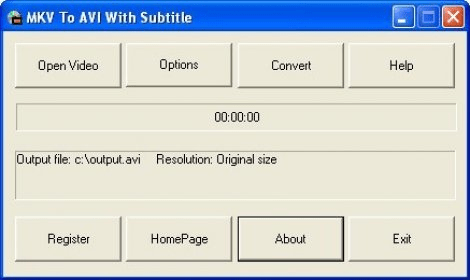
MKV To AVI With Subtitle 2.0 is a video conversion tool. I think the name is self descriptive. It allows you to convert MKV files to AVI files and hardcode subtitles into the final video. The application is really basic, its GUI consisting of only one screen. It requires that you install the CCCP codec pack in order to work. Once you do that, you will be able to not only convert from MKV files into AVI files but also from and to AVI, MP4, and several other formats. I tried processing an AVI compressed using an Xvid codec with SRT subtitles and converting it into an uncompressed AVI file. The video used up 2.5 gigabytes on the hard drive and the subtitles were effectively hardcoded to the video. There was one problem though. The image had too much blue tint. I am not able to access the video settings in the trial version. The full version might solve that. Also, you are limited to a minute of video in the trial version. It took nearly 3 minutes to process the video, and it wasn't even high definition. So I am taking it that processing large MKV files could be nerve-wrecking. Still, it is not the application's fault. Other than that blue tint mishap and the inability to access the video settings, the application did a great job. Even though other application can hardcode subs onto video, this is the easiest I have tried so far.
  • Easy-to-use.
  • Hardcodes subtitles.
  • I had some problems with the output file.
  • Couldn't access video settings.

Reviewed by: José Fernández

Reviewer rating:

Reviewed: 2 years ago

Report a wrong version Report a wrong program title Suggest a correction

Screenshots

Main window Main window Main window Main window Main window Main window Output options Output options
All 7 screenshots

Latest comments

green808angel(beginner) Last year 
This program worked ok for me, except the output video was a little glitchy and lagged quite a bit. I'm not sure if that was just because I used the trial version, but it scared me enough to not want to buy the full-version just to end up having the same thing happen.
Reply
Add new comment

E-mail Address:

Password:

Register now »

Forgot password?

Sign in with:
Download Software Informer Client
Copyright © 2012, Informer Technologies, Inc. About| Privacy and terms| Help| Feedback & Support| Partners program